Vendors Introduction
Vendor is a person or company that provides services or materials for property maintenance and operations. This includes contractors like plumbers, electricians, cleaning, and repair service providers.
Vendor List
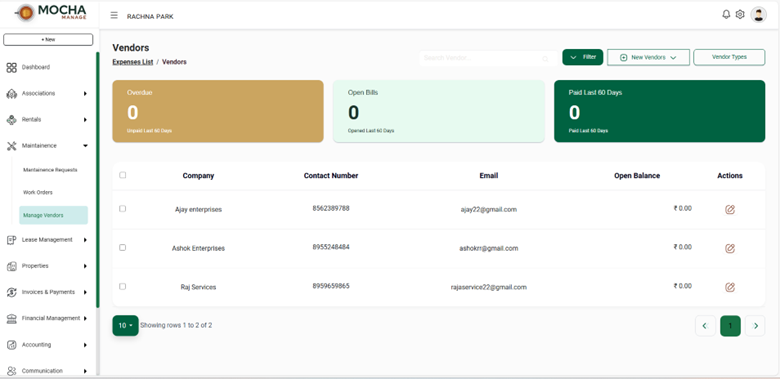
- The Vendor List page displays all vendors added to the system.
- It helps you manage supplier details, track open balances, and monitor vendor-related expenses.
Top Section
- Overdue
Shows the total number of vendor bills that are overdue in the last 60 days. - Open Bills
Displays the number of bills that are still open (unpaid) in the last 60 days. - Paid Last 60 Days
Shows the number of vendor bills that were paid in the last 60 days.
These section give a quick financial overview of vendor payments.
Filter Vendor
- Click on the Filter button to narrow down vendors based on specific criteria.
- Helps quickly locating required vendor records.
Add New Vendor
- Click New Vendors to add a new vendor.
- You can enter vendor details such as:
- Vendor name
- Company name
- Contact number
- Other required information
Vendor Types
- Use Vendor Types to categorize vendors (e.g., service vendors, material suppliers).
- Helps in better organization and reporting.
Vendor List Table
The table displays the following details for each vendor:
- Company – Name of the vendor
- Contact Number – Vendor's phone number
- Email – Vendor's email address
- Open Balance – Outstanding amount payable to the vendor
- Actions – Edit vendor details
Edit Vendor
- Click the edit icon under Actions to update vendor information.
Select Vendors
- Use the checkbox next to vendor names to select one or multiple vendors for bulk actions (if enabled).