Lease Renewals
The Lease Renewal module allows property managers and leasing agents to manage lease renewals in an organized, trackable workflow. This functionality is divided into four key sections and multiple status stages to monitor progress.
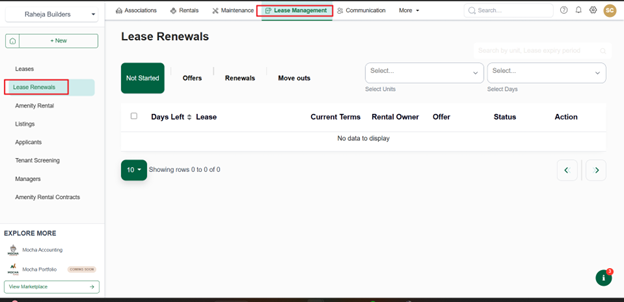
Sections in the Lease Renewal:
- Not Started: Leases that are nearing expiry but no renewal action has been initiated.
- Offers: Leases where a renewal offer has been created but not finalized.
- Renewals: Leases that are in the active renewal process (offer accepted/lease generated).
- Move Outs: Leases where tenants have declined renewal or lease will not be extended.
Each lease renewal progresses through the following status stages:
| Status | Meaning |
|---|---|
| Not Started | No action taken yet on renewal. Lease is nearing end but pending review. |
| Offer Generated | A renewal offer has been drafted but not sent to the tenant. |
| Offer Sent | The drafted offer has been sent to the tenant for their decision. |
| Offer Accepted | The tenant has accepted the offer. Ready for lease generation. |
| Offer Rejected | The tenant has declined the offer. May trigger move-out preparation. |
| Offer Rescinded | Property manager has withdrawn the offer before tenant action. |
| Lease Generated | The official lease has been generated based on the accepted offer. |
| Lease Sent | The lease document has been sent to the tenant for e-signature. |
| Lease Signed | The tenant has signed the lease. Renewal is now complete. |
Following are steps to access the Renewal lease:
- Navigate to the Lease Renewal module.
- View leases under the Not Started section to identify those approaching expiration.
- Click on a lease to generate a renewal offer and send it to the tenant via email or in-app notification.
- Monitor tenant responses and take the following actions: If accepted, proceed to generate a lease. If signed, lease is renewed and moved to active leases. If rejected, mark the tenant as a move out and initiate end-of-lease activities.